
Download Phone Data Manager – Mobile App, Tool, Utility, Productivity, Smartphone
Overview
Phone Data Manager is a mobile application developed by Microsoft, designed to simplify the synchronization of mobile phones with computers. Its primary purpose is to streamline the transfer of multimedia content—such as photos, music, and videos—between mobile devices and desktop systems. The app addresses common challenges users face when manually managing files across platforms, offering a more efficient and secure alternative to traditional file-sharing methods. By leveraging both Bluetooth and USB connections, Phone Data Manager reduces the technical barriers often associated with device pairing and data transfer.
The target users include individuals who frequently move media between their smartphones and computers, especially those using Windows-based systems. The app is particularly beneficial for users who rely on Hotmail (now Outlook.com) and wish to keep their contact lists synchronized across devices. Although the developer did not provide additional technical details about the app’s architecture or underlying protocols, its functionality suggests a focus on cross-platform interoperability and user accessibility.
Real-world use cases include transferring vacation photos to a computer for editing, backing up music libraries, or updating contact information across multiple devices. In the broader app ecosystem, Phone Data Manager serves as a foundational utility for mobile data management, especially during an era when cloud-based solutions were less mature. Its release in 2008 marked a step forward in bridging the gap between mobile and desktop environments.
Key Features & Functionality
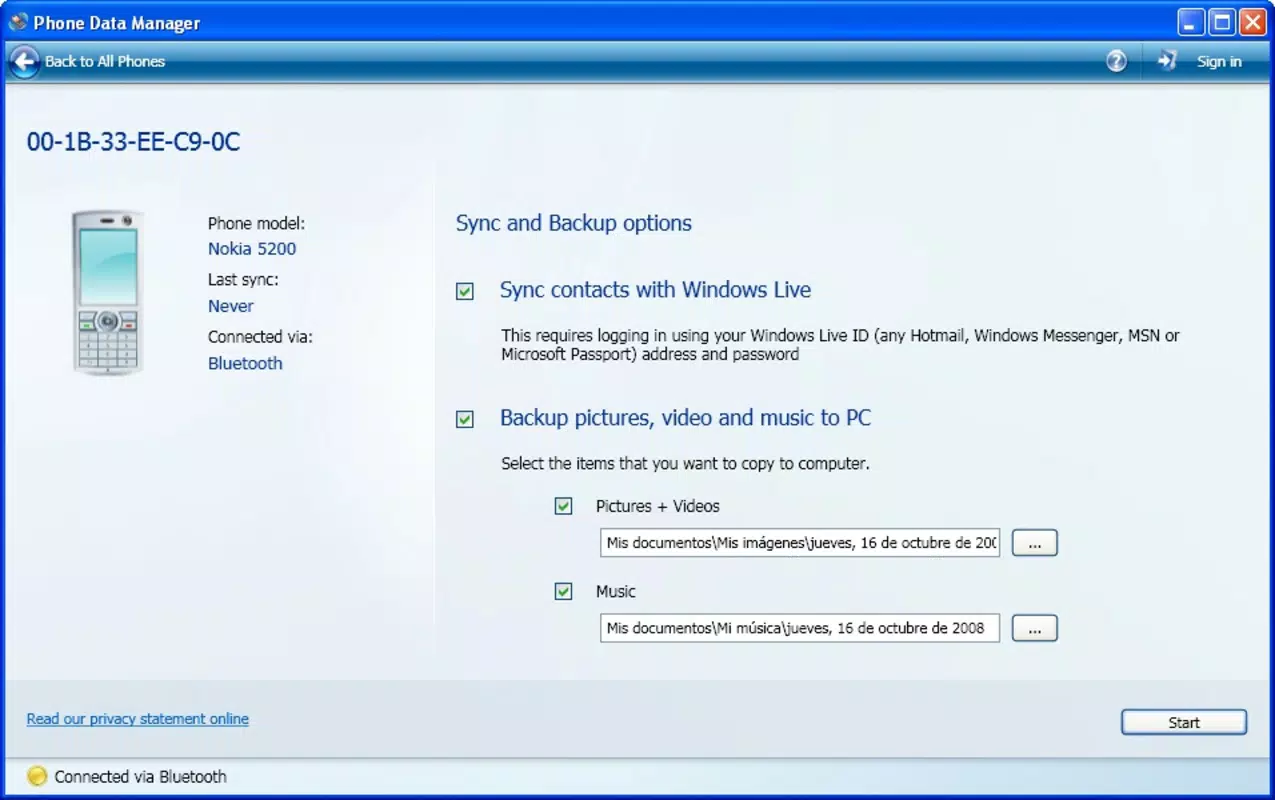
- Easy Media Transfer: Enables users to transfer photos, music, and videos from their mobile device to a computer with minimal effort. This feature is ideal for users who want to preserve or organize their multimedia files on a larger screen.
- Contact Syncing: Allows synchronization of phone contacts with Windows Live Mobile, enhancing data consistency for Hotmail users. This feature helps maintain up-to-date contact information across devices.
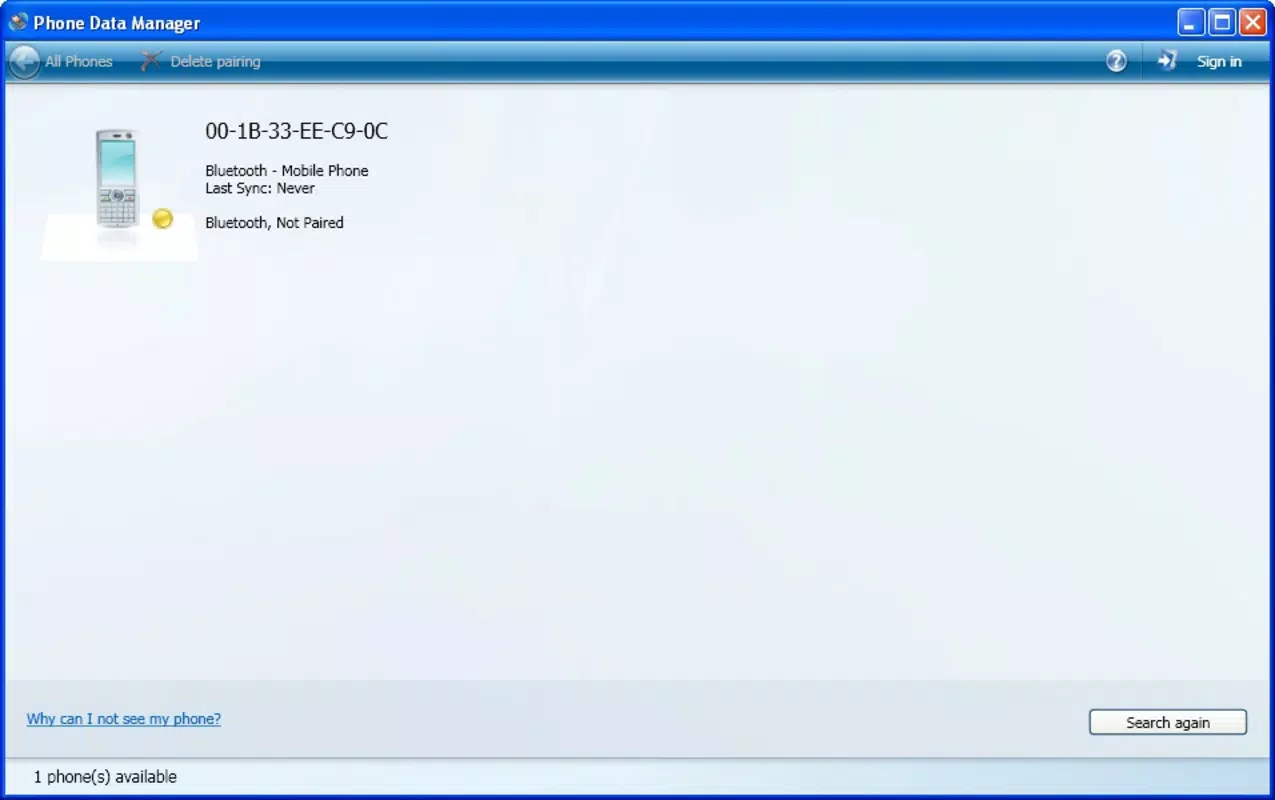
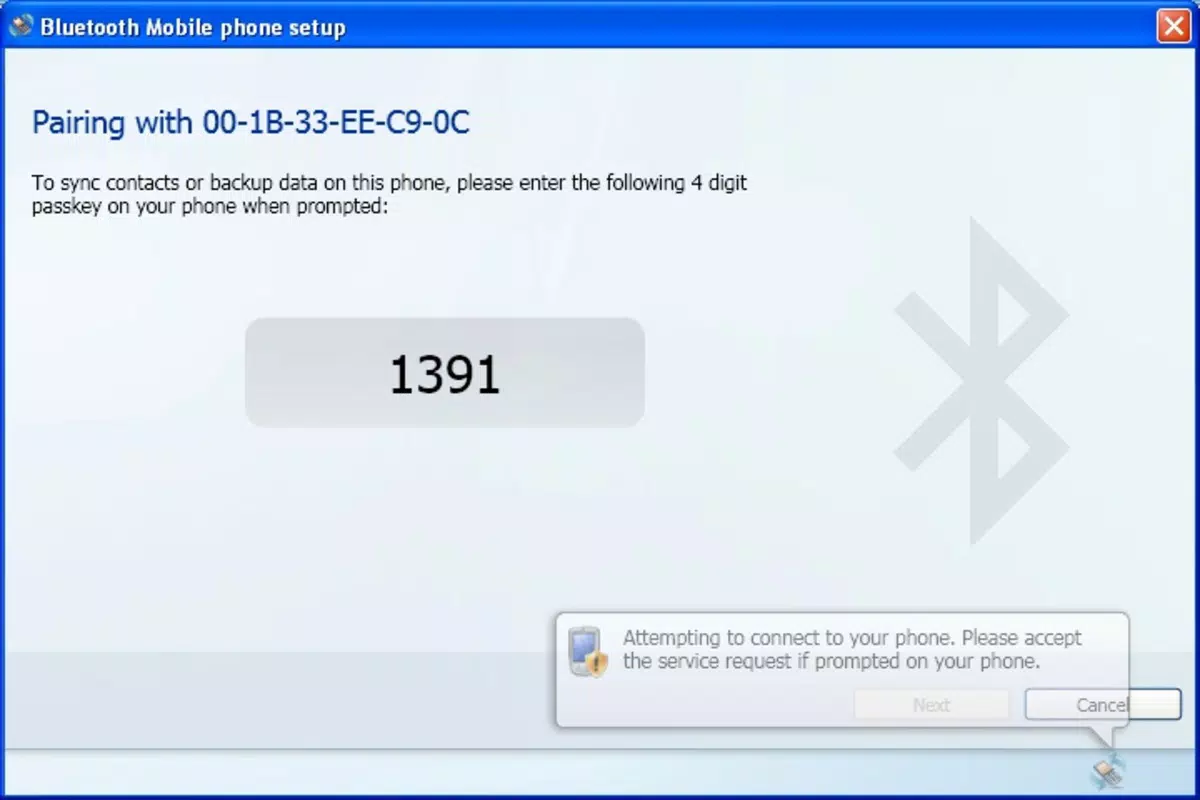
- Simple Pairing Process: The app guides users through a straightforward pairing procedure by requiring only the input of a key generated by the program. This reduces friction during initial setup and improves user adoption.
- Bluetooth and USB Support: Offers dual connectivity options, giving users flexibility in how they link their devices. This adaptability ensures compatibility with various hardware configurations and usage preferences.
- Compatibility with Multiple Devices: While tested with models from Nokia, Motorola, and Sony-Ericsson, the app may support other devices as well. Users are encouraged to attempt pairing with their specific models, even if not explicitly listed.
For example, a user could use the app to quickly transfer a video recorded on their phone to their computer for editing, then sync updated contact details with their Hotmail account. These workflows demonstrate how Phone Data Manager enhances productivity and data management in everyday scenarios.
Interface, UX & Performance
The user interface of Phone Data Manager appears to prioritize simplicity and functionality, aligning with Microsoft’s design principles of the time. The layout is likely structured around clear navigation paths, with labeled options for media transfer, contact sync, and device pairing. Visual style emphasizes usability over ornamentation, making it accessible to users of varying technical skill levels.
Navigation flow is expected to be linear and intuitive, guiding users step-by-step through each process. The pairing process, in particular, is designed to be user-friendly, requiring minimal input beyond entering a key. This focus on ease of use helps reduce the learning curve, especially for less tech-savvy individuals.
Although the developer did not list formal performance metrics, the app’s reliance on established protocols like Bluetooth and USB suggests stable operation under typical conditions. Responsiveness is likely consistent across devices that meet the minimum requirements. Stability may vary depending on the mobile device model and operating system version, though no specific reports of crashes or errors were mentioned.
Platform Compatibility & Technical Requirements
Phone Data Manager is available for the Windows platform and was released on October 17, 2008. The application supports both Bluetooth and USB connectivity, providing users with multiple options for device pairing. The file size is listed as 1.3 MB, indicating a lightweight footprint suitable for systems with limited storage.
Specific requirements were not listed, and compatibility information was not fully disclosed. The developer did not specify minimum OS requirements or device specifications. As such, users should ensure their system meets general Windows compatibility standards. The app may not be available on modern operating systems due to its age, and its functionality may depend on the presence of legacy drivers or software components.
Pros and Cons
Pros
- Supports both Bluetooth and USB connections for flexible device pairing.
- Enables quick and secure transfer of photos, music, and videos.
- Facilitates contact synchronization with Windows Live Mobile, benefiting Hotmail users.
- Simple pairing process with minimal user input required.
- Lightweight design with a small file size of 1.3 MB.
Cons
- Compatibility with modern devices and operating systems is uncertain.
- Developer did not provide detailed technical specifications or system requirements.
- Limited to Windows platform; no information on iOS or Android availability.
- Released in 2008, which may affect long-term support and security updates.
- Does not include cloud-based backup or advanced file management features.
FAQ
Is Phone Data Manager compatible with all smartphones?
The app has been tested with models from Nokia, Motorola, and Sony-Ericsson, but compatibility may extend to other devices. Users are encouraged to try it with their specific model.
Can I use Phone Data Manager on a Mac or Linux system?
There is no information indicating support for Mac or Linux. The app is designed for the Windows platform.
Does the app require an internet connection?
While the app does not require a constant internet connection for file transfer, contact syncing with Windows Live Mobile may require an active connection.
Is Phone Data Manager safe to download and install?
As a Microsoft-developed tool, it is considered secure. However, users should only download from official sources to avoid potential risks.
How do I update Phone Data Manager?
Given its release date in 2008, no official update mechanism or newer versions have been documented. Users should rely on the original installation package.
Final Thoughts
Phone Data Manager remains a notable example of early mobile data management tools, offering a practical solution for users needing to transfer media and sync contacts between mobile devices and Windows computers. Its dual connectivity options, simple pairing process, and focus on core functionality reflect a thoughtful approach to user needs at the time of its release.
While its age limits its relevance in today’s ecosystem—especially with the rise of cloud services and native device integration—those still using legacy systems or older devices may find value in its straightforward design. The app’s lightweight nature and minimal resource usage make it a viable option for low-spec machines.
For users seeking a reliable, no-frills tool to manage phone data on Windows, Phone Data Manager offers a proven, secure method of file transfer and contact synchronization. Despite its outdated status, it continues to serve niche use cases effectively.
Download Phone Data Manager now


